
How it scores
What we love (and don't)
// PROS
- One account and one credit balance across 50+ image, video, and audio models from about a dozen vendors
- Cinema Studio and Marketing Studio teach a genuinely useful mental model for building video
- Higgsfield Academy's 40-minute, shot-by-shot tutorials are the best onboarding in the category
- CLI and MCP behavior matches the documented schema, and cost is queryable before you spend
- Seedance 2.5 in plain mode anchors to real reference images instead of hallucinating
// CONS
- The homepage is visually assaultive -- so busy you don't know where to look or where to start
- Marketing Studio's default "ugc" mode silently rewrites plain prompts into an invented spokesperson script
- Dense or small text reliably garbles in generated images and video
- Duration and cost mechanics are undocumented until you query them
- High-volume single-model work usually costs more through credits than direct API access -- and credits expire
- 24+ image model options with no guidance on which to pick
Sponsored. This review is a paid placement published under TechSifted’s sponsored content policy: sponsors buy the review slot, never the verdict.
Verdict up front: Higgsfield is worth it – for two audiences that could not be more different from each other. If you’re a beginner who wants one place to explore every major AI image and video model, this is the best playground on the market. If you’re a cinematographer or producer with real prompting craft, the ceiling here is remarkable. If you’re anyone in between – particularly someone who generates the same kind of asset at volume – keep reading before you subscribe, because the math changes.
My working question for any tool is never just “does it work?” It’s “who does it work for, and in what context?” Higgsfield is the rare product where that question has two correct answers at opposite ends of the skill curve, and almost nothing in the middle.
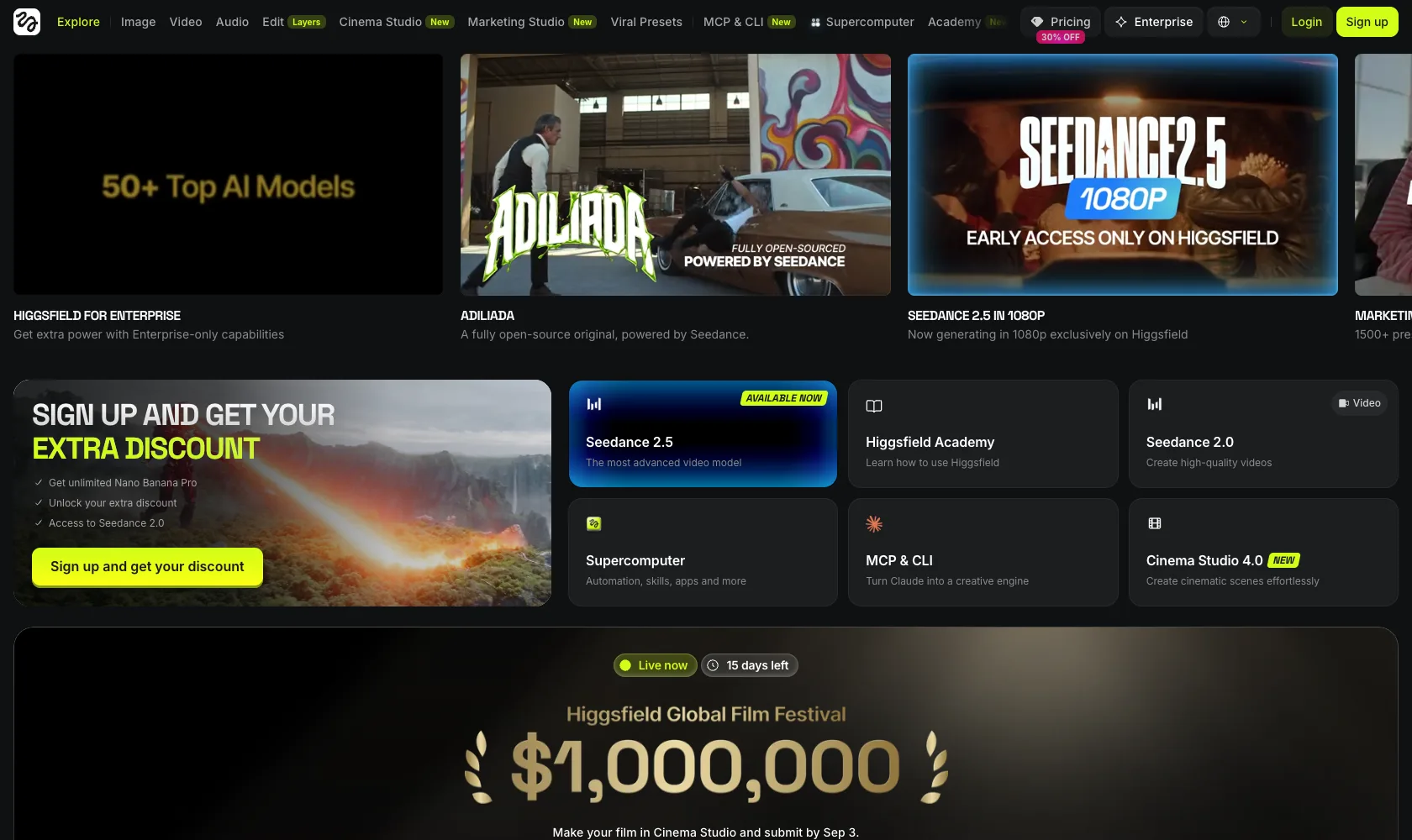 Higgsfield’s front door: seven ways in, and no signpost.
What Higgsfield Is
The cleanest way to understand Higgsfield (higgsfield.ai) is as an OpenRouter for multimodal AI. One account, one credit balance, and a unified schema across 50+ image, video, and audio models from about a dozen vendors – Kling, Seedance, Seedream, Veo, FLUX, Grok, Nano Banana, and the rest of the current first tier (a handful of those entries are utilities like upscalers and background removers rather than generators). You can query what a generation will cost before you spend a credit. For anyone who has juggled six vendor accounts, six billing pages, and six inconsistent APIs, that pitch lands immediately.
But the OpenRouter analogy breaks in one important place: OpenRouter is neutral infrastructure, and Higgsfield is not. It ships its own proprietary models (the Soul line), and it wraps everything in opinionated product layers – Cinema Studio, Marketing Studio, Viral Presets, a training library called Higgsfield Academy, and an AI assistant named Supercomputer. Some of those opinions are the best thing about the product. One of them, as you’ll see, actively rewrites what you asked for.
The Playground Is the Headline
The single strongest thing about Higgsfield is the most obvious one: it is one spot to try every major image and video model. Want to see how Kling, Seedance, and Veo each interpret the same prompt? That’s a five-minute exercise here and an afternoon of account creation anywhere else. For exploration – for building your own intuition about which model does what – nothing else in the category comes close.
The model picker is where that strength shows its other face. The image side alone offers 24+ options, and several of them are mere tiers of one family: four variants of Nano Banana, three of Seedream. There is no guidance on which to pick. If you arrive knowing exactly what you want, that wall of near-duplicates is friction. If you arrive wanting to learn the landscape, it’s arguably the point – the differences between tiers of the same family are exactly the kind of thing the playground exists to teach you. Both readings are true. Which one applies to you depends entirely on why you showed up.
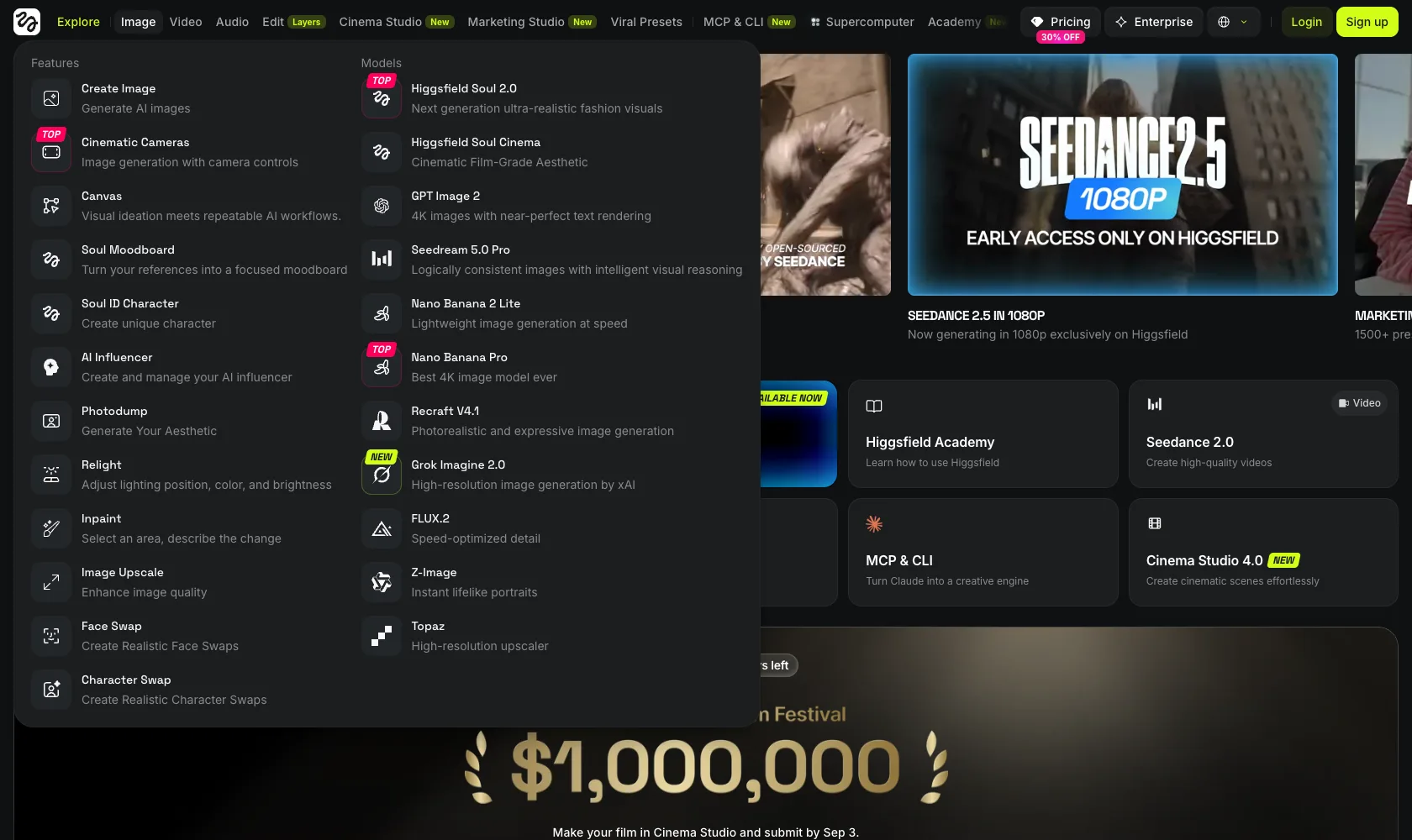 The image menu: eleven model entries before you’ve written a word of prompt.
The Opinionated Layers Are Better Than They Sound
Cinema Studio and Marketing Studio read, at first glance, like marketing wrappers. They’re not. They are a genuinely useful mental model – products within the product that teach you how professional AI video actually gets assembled. Cinema Studio frames the work the way a director would: shots, camera moves, scene construction. Marketing Studio frames it the way an ad producer would. Even if you never ship anything from either studio, working through them reorganizes how you think about the raw models underneath.
Higgsfield Academy deserves specific praise. The tutorials are full-length videos – some approaching an hour – that walk shot by shot through how to prompt each shot of a finished piece. Not sizzle reels. Actual craft instruction. The Academy’s own output is also the clearest evidence of what this platform can do in skilled hands, which matters for the verdict later.
And for technical users: the CLI and MCP integration are quietly excellent. Behavior matches the documented schema – what the docs say a parameter does is what it does – and cost is queryable before you commit. In a category where APIs routinely surprise you, predictability is a feature worth naming.
Where Higgsfield Gets in Its Own Way
Now the friction, and there’s real friction.
The front door is disorienting. The homepage presents entry tiles for image, video, audio, edit, Cinema Studio, Marketing Studio, and Viral Presets. Three of those seven make videos, for different purposes, and nothing on the page tells you which one matches your situation. An AI product – of all products – should ask what you’re trying to accomplish and route you there. Higgsfield doesn’t. It hands you seven doors and wishes you luck. The Supercomputer assistant may eventually fill this gap, but the default experience today is a wall of options with no concierge.
The interaction model assumes you already know how to ask. The whole experience pushes you toward one-shot prompting an entire scene, rather than a dialogue that clarifies your intent before spending your credits. One-shot prompting is itself an expertise – a real craft that most users don’t have and don’t know they don’t have. The product’s structure quietly assumes it.
Marketing Studio’s default will surprise you. Marketing Studio Video defaults to a “ugc” mode that silently rewrites a plain prompt into a scripted, invented spokesperson. Nothing discloses the rewrite. Give it a straightforward product prompt and you can get back a fabricated person delivering lines you never wrote – and the rewrite can fail the job outright, not just restyle it. An undisclosed prompt transformation that changes what the output is should be a labeled toggle, not a default.
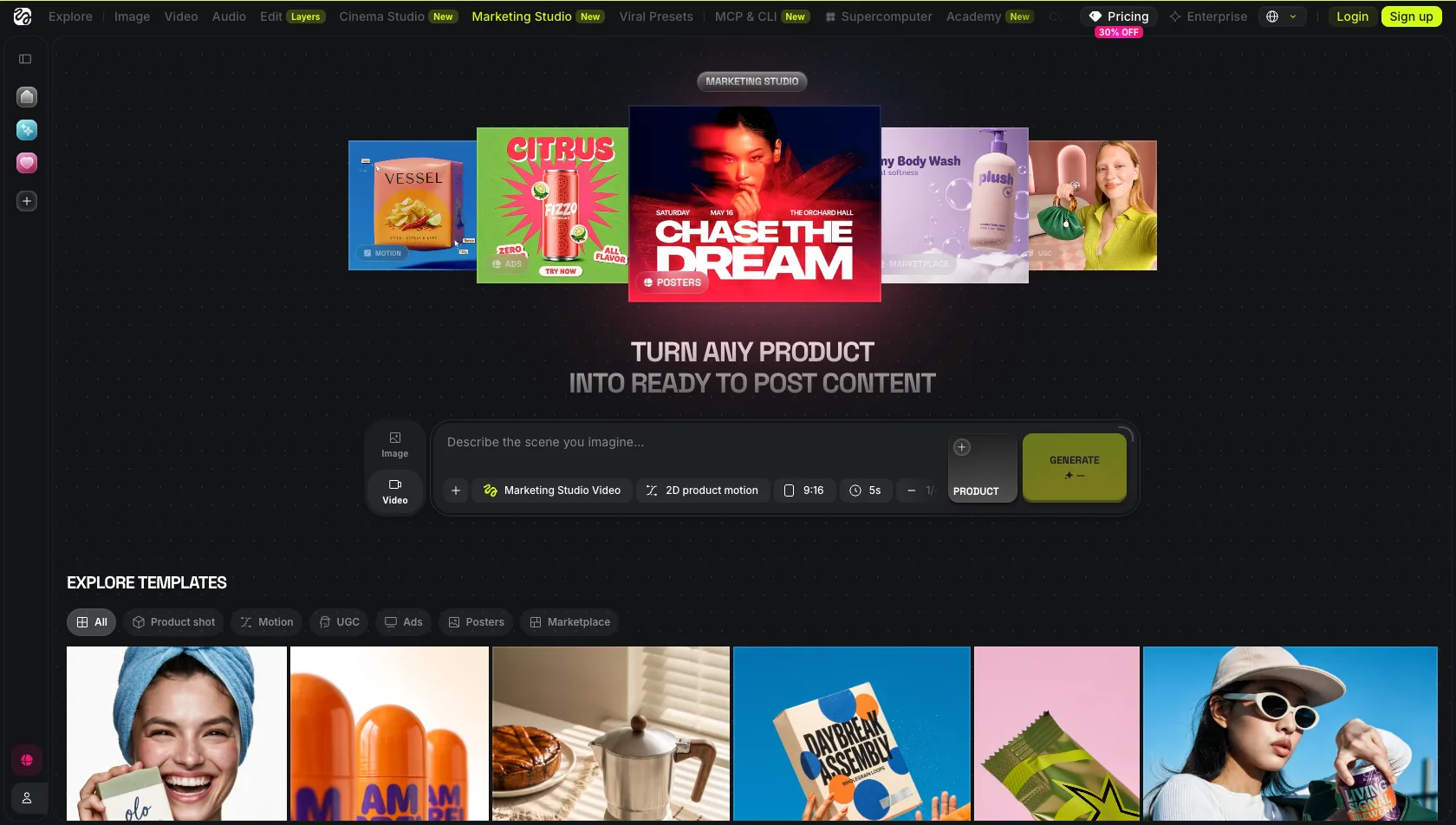 Marketing Studio’s video composer. The UGC treatment lives one unlabeled default away.
Output Quality: The Consistent Findings
The models themselves are the same first-tier models you’d get anywhere, so quality tracks the underlying vendor. A few findings held consistently in our own use – and they deserve an honest frame before the list: this was our experience. Some of it may be the models’ limits; some of it may be how we prompted them. Prompting these models well is a real art – one we understand, but do not specialize in.
- Text is the reliable failure. Dense or small text garbles in generated images and video. This is a known weakness across the category, and Higgsfield’s aggregation doesn’t rescue it. Keep text out of your generations and composite it afterward.
- Lip-synced dialogue drifts. Characters do not reliably say the exact words you gave them. Close, often; exact, no. For anything where the words are the point, plan a correction pass.
- Reference anchoring works where it counts. Seedance 2.5 in plain mode (text-to-video and omni-reference) correctly anchors to a real reference image instead of hallucinating a fake version of it – the failure mode that makes so many tools useless for product and UI work. This is one of the platform’s most practically valuable behaviors.
- The mechanics are undocumented until queried. Seedance 2.5 has a floor of 4 seconds, a ceiling of 30, and runs roughly 6.5 credits per second at 720p and 9 per second at 1080p. None of that is on a spec sheet – you learn it by asking the API. The fact that you can query it is good engineering; the fact that you have to is a documentation gap that costs new users real credits.
Pricing, As of August 2026
These numbers come straight from Higgsfield’s live pricing page as of this writing – worth stating, because third-party price roundups published just weeks earlier show different tiers. Treat any snapshot, including this one, as perishable:
- Starter – $19/month (billed annually): 270 credits/month
- Plus – $47/month (billed annually; $59 month-to-month): 1,200 credits/month
- Ultra – $99/month (billed annually; $129 month-to-month): 3,000 credits/month, with 6,000- and 9,000-credit options above it
- Unlimited models: each plan includes a set of “unlimited & free generation” models – 3 on Starter, 7 on Plus and Ultra. Read the fine print: they work only in the web app, not via the MCP/CLI, Canvas, or Supercomputer.
- Top-ups: Higgsfield’s documented Auto-Refill rate is $1 = 18 credits; per Higgsfield’s own help center, credit-pack credits are valid for 90 days from purchase, and monthly plan credits don’t roll over.
For scale, Higgsfield’s own examples price a Nano Banana Pro image at 2 credits and an 8-second Kling 3.0 clip at about 14 credits. The video math is what catches people: at 9 credits per second for 1080p Seedance, the Starter plan is roughly 30 seconds of premium video per month. Image work stretches much further. Plan around what you actually generate, not the headline credit number.
The broader sentiment among reviewers is consistent with that math: strong praise for the model breadth and generation speed, recurring complaints about credit burn on premium models, throttling on the heaviest tiers, and slow email-only support. Trustpilot sits around 3.2 out of 5. None of that changes the verdict for the audiences this platform serves well, but it should calibrate your expectations if something goes wrong with billing.
The Volume Math: When You Shouldn’t Be Here
Here is the clearest “not for you” case, with numbers.
Suppose your workflow is fixed: you generate the same kind of image, a thousand times a month, with one model you’ve already chosen – say Seedream. Direct API access through a router like fal.ai runs about $0.03 per image, or roughly $30 for the month. The same thousand images through Higgsfield – 1 credit each – run $33 on the biggest annual plan and up to $50 on top-up credits. Best case a wash, worst case two-thirds more. And the structural costs stack on top of the per-unit math: monthly credits don’t roll over, top-up credits expire after about 90 days, and pricier models widen the gap – Nano Banana Pro runs 2 credits, Seedream 5.0 Pro runs 3. You’d be maintaining a subscription for a model picker you no longer need and studio layers you’ll never open.
Note also that the plans’ “unlimited” models are web-app only – an MCP/CLI workflow always burns credits. Video is less clear-cut: Higgsfield’s effective per-second rates on Seedance are competitive with – sometimes below – what the same family costs per second on direct API routes, and the math shifts with model, resolution, and route. So for volume video work the honest answer is “run your own numbers.” But the principle holds either way: Higgsfield’s subscription buys breadth. If your workflow has already collapsed to one model and one asset type, you are paying for breadth you don’t use, and a direct API may well cost less. That’s not a flaw. It’s just not what this product is for.
Who Higgsfield Is Actually For
This is the part I find genuinely interesting about Higgsfield: it rewards the two ends of the skill curve and underserves the middle.
The explorer. You’re new to AI generation, you have no idea whether you need Kling or Veo or Seedream, and you’d rather learn by doing than by reading vendor marketing. The playground is built for you. One subscription replaces a dozen accounts, the Academy teaches you the craft, and the breadth that overwhelms the homepage becomes the product’s whole value.
The director. You think in shots. You know what a push-in at dusk should look like and you can specify it. Prompting video well is a craft – most users can’t do it and won’t learn – and in hands that can, what Higgsfield enables is very impressive. The Academy’s own output is the proof of ceiling. High ceiling, demanding floor: if you clear the floor, the ceiling is yours.
Not for the production line. If you produce the same asset type at high volume with a model you’ve already chosen, the credit economics work against you and the platform’s breadth is dead weight. Go direct.
The Bottom Line
Higgsfield is an ambitious, opinionated aggregation of the entire multimodal frontier, and most of its opinions are good. The playground is the best model-exploration experience available. The Academy is the best training material in the category. The CLI and MCP are predictable in a space where little is. The homepage needs an editor, Marketing Studio needs to disclose its rewrites, and the documentation needs to catch up to what the API already knows.
Recommended – for the beginner who wants to explore everything, and for the filmmaker who can exploit anything.
For where the underlying models sit against each other, see our reviews of Kling AI and Runway ML, and the Best AI Video Generators 2026 roundup.