
How it scores
What we love (and don't)
// PROS
- Fast in practice, not just in the marketing copy: a full landing page section, styled to match an existing hero, took three prompts
- AI-generated sections default to correct heading order, real paragraph tags, and descriptive alt text without being asked
- The AI caught its own accessibility issue unprompted, a CTA link under the WCAG 2.2 minimum touch-target size, and its contrast math checked out exactly against an independent calculation
- The built-in CRM is a real working pipeline, not a marketing bullet: a lead submitted through an AI-built form landed in the CRM immediately
- Sitewide color and typography controls make an on-brand rebuild fast, which matters when you're doing this across multiple client accounts
- A genuinely free plan (no credit card) plus paid tiers starting under $20/month
// CONS
- Standard drag-and-drop template blocks ship with zero heading tags and zero alt text by default: three separate templates I checked all came back the same way
- map[The AUTO SEO tag setting sounds automatic but isn't:Onepage confirmed nothing assigns heading tags on its own, you set every H1 through H6 by hand]
- The site-level language attribute defaulted to German on pages written entirely in English, on every page I checked, a quiet signal problem for both SEO and screen readers
- The editor takes about 20 seconds to load with no loading indicator, so it looks broken before it looks fine
Onepage promises a website in an afternoon. I built a styled, on-brand landing page section in three prompts and under ten minutes, so on the headline claim, it delivers.
Here’s the fuller picture. The AI’s own output is better structured than I expected walking in: correct heading order, real paragraph tags, alt text, all without being asked. The platform’s standard template blocks are the opposite story, and if you’re an agency selling “SEO-friendly” to a client, that gap is the thing to understand before you build on it.
 A stock template, live on Onepage, with the AUTO tag setting still showing the unfilled placeholder headline.
What Onepage Actually Is
Onepage is a website, landing page, and funnel builder pitched squarely at agencies, freelance designers, and small businesses that publish client sites on a schedule. It bundles hosting, a drag-and-drop page builder, a built-in CRM, analytics, and an AI assistant that generates custom React sections from a plain-English prompt, all under one account, one bill.
The pitch is agency economics, not creator economics. Onepage’s own agency page talks about margin per project and revenue per employee, not “build your first landing page.” If you build sites for other people and bill by the project, Onepage is talking to you specifically.
The Build Speed Is Real
I gave the AI one sentence: I’m selling energy-efficient solar panels, build me a page. In just over three minutes it shipped a full hero section: dark “instrument datasheet” styling, an hourly generation chart, a headline built around a real-sounding number, two CTAs. Then it asked whether to keep the direction before building the rest. That’s the right instinct: show me a direction, get a yes, then keep going.
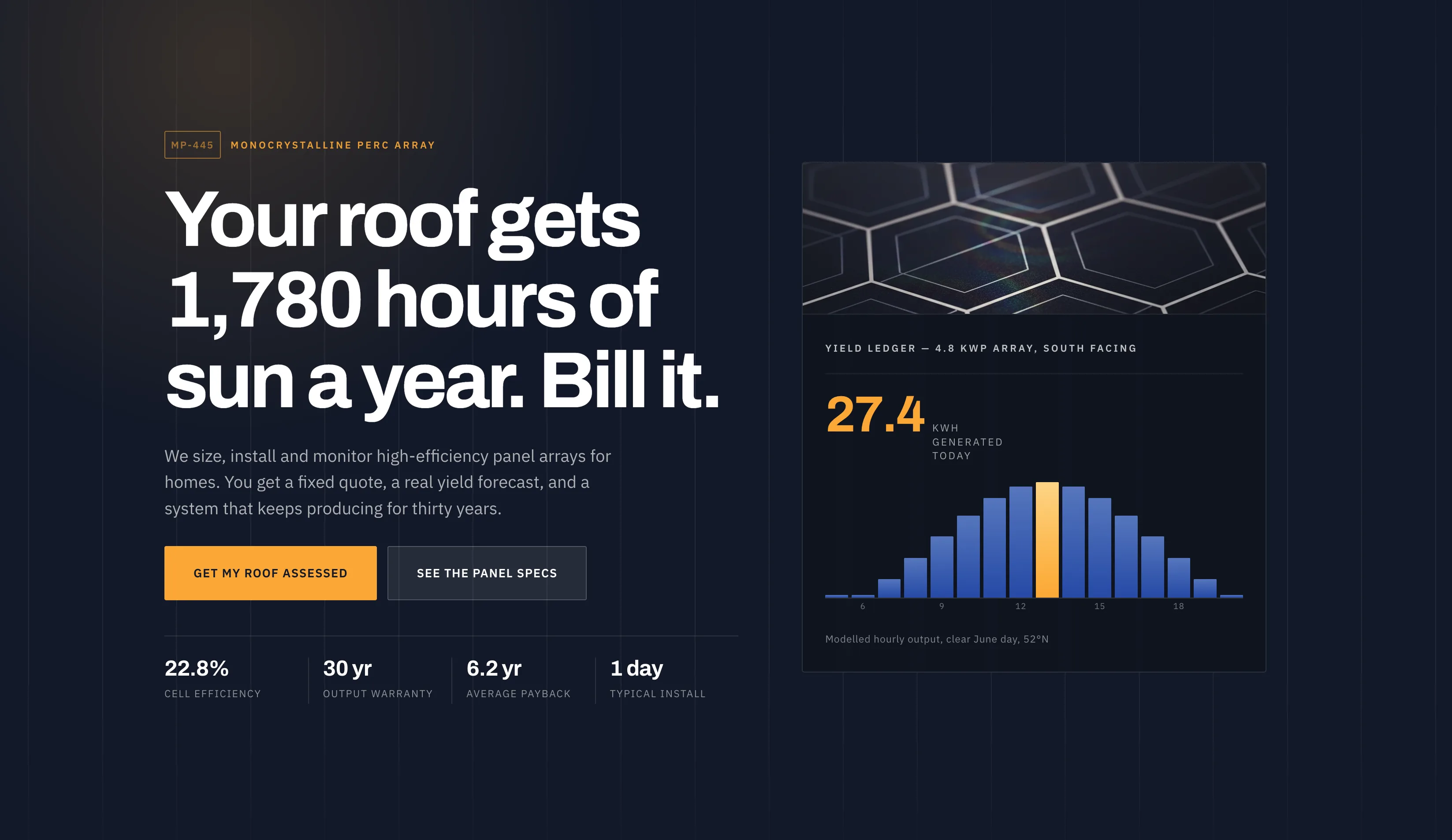 The full hero section, built from one sentence: “I’m selling energy-efficient solar panels, build me a page.”
Two more prompts (a photo-plus-copy section, then a CRM-wired quote form) took under ten minutes total and produced a page that reads as one coherent design system, not three bolted-together blocks. The AI reused its own component library between prompts, a shared field primitive here, a shared spec-row layout there, instead of reinventing the wheel each time. For an agency turning around client pages on a deadline, that speed is the whole pitch, and it held up.
The editor itself is the one soft spot in “fast.” Cold start took about 20 seconds, with a blank canvas and no loading indicator before it settled. That was long enough that I checked whether something had broken.
The AI’s Own Output: Better Structured Than I Expected
Here’s what surprised me. Every section the AI generated (hero, content block, form) came back with correct heading order (h1 → h2 → h3), real <p> tags, and descriptive alt text on every image it created. I never asked for any of that. It just does it.
It goes further than markup. Asked a battery of technical questions about Core Web Vitals, image handling, font loading, and color contrast, the AI read its own component source before answering rather than guessing, and when I checked its contrast math independently, it matched to the byte. It also flagged an accessibility issue on its own (a call-to-action link under the WCAG 2.2 minimum touch-target size) before I asked about it. That’s not a tool bluffing confidence. It told me “I don’t know” five separate times rather than invent a number, on questions like gzipped bundle weight and whether its animation library gets re-shipped per section.
The CRM-wired form is the clearest proof this isn’t just a demo. I asked for a quote form wired to the CRM, and three minutes later it had one: six labeled fields, inline validation, a working success state. I submitted a test lead through it, and it landed in Onepage’s built-in CRM immediately. No Zapier, no third-party form tool, no manual export. That’s a real pipeline, not a marketing bullet point.
Where the AI Draws a Hard Line
Onepage runs two different assistants, and they don’t overlap the way you’d expect. The one you’ll meet in the builder by default is scoped narrowly to custom React sections (it calls itself the “React Component Assistant”) and it will not touch a page’s title, its SEO fields, or a standard drag-and-drop block. I asked it directly to change a headline to an H1 tag. Here’s how that went:
Me: Can you change the title on the page to be an H1 tag?
AI: I’d be happy to help… Which title are you referring to? Are you asking about the page’s SEO/metadata title, or a visible heading/title element currently on the page?
After I pointed at the specific text:
AI: This request is about the page’s SEO title/metadata, not a React component task. That falls outside what I handle as the React Component Assistant. I specialize only in building and editing React vibe sections and @siteui packages… For changing the SEO title or making it render as an H1 tag, you’ll want to use OnePage’s page settings/SEO panel directly in the builder.
That’s an honest, well-scoped answer. It’s also a real point of friction: the assistant misread a visible headline as the page’s metadata title, and its own suggested workaround (wrapping an H1 inside a custom React component) would put that heading in the one part of the page it built itself, not the standard block the client actually sees on every other page. If you’re relying on the AI to also manage the SEO fundamentals of a page, it will tell you, clearly, that isn’t its job.
SEO: Two Very Different Stories on the Same Platform
This is the part worth slowing down for, because the two halves of Onepage behave completely differently.
AI-generated sections came back clean. Correct heading order, real paragraph text (not a <div> standing in for a heading), descriptive alt text on every image. I checked this directly, since I’d wrongly assumed the opposite in earlier testing: the text renders inline in the page’s own HTML, not sandboxed inside an iframe. Search engines get the words.
Standard template blocks did not. I checked three separate stock templates, all untouched, and all three came back with zero heading tags, zero <p> tags, and zero alt text across more than a hundred images combined. Onepage’s own wrapper still labels these blocks component-header and component-text internally, but what actually publishes is a plain <div>. That’s not a bug in the traditional sense. It’s the default state before anyone assigns tags, but it means an agency handing a client a “done” site built entirely from templates needs to go back and set every heading level by hand.
One more thing sits next to that. The AUTO SEO tag setting on a native builder block (not a React section, the standard blocks) reads like it will assign heading tags for you, in some sensible order, once you turn it on. It doesn’t. I checked this on three separate templates and got the same result each time: the block published as a <div> with an accessibility role of “generic,” not a heading. I flagged it to Onepage on September 8, and their dev team confirmed on September 14: this is intentional, not a bug. Nothing assigns heading tags automatically, AUTO included, and every H1 through H6 has to be set by hand, either in the element’s own settings or, Onepage’s preferred path, in Project Settings → SEO. If you’re relying on the AUTO setting to hand you real heading tags on publish, it won’t.
The platform-level SEO basics, for what it’s worth, are solid across the board: self-referencing canonicals, an automatic sitemap that updates to the minute, a correctly configured robots.txt, HTTPS everywhere, and fast time-to-first-byte on every page I tested. The gap is specifically at the block level, not the infrastructure level.
One smaller item in the same bucket: every page I checked shipped with lang="de" in the HTML, including pages written entirely in English. That traces to a site-level language default set once, at setup, that every page inherits. It’s worth checking your own site settings, because it’s a real (if quiet) signal to both search engines and screen readers.
A Feature Idea Worth Passing Along
One thing I noticed while the AI built the solar page: it never asked what city or region the business serves before writing location-dependent copy. For a platform whose core buyer is a local agency or a small business owner, that’s a natural spot for the AI to ask one clarifying question before it starts generating. That’s the way a junior copywriter would ask “where’s this for?” before opening a doc. It wouldn’t need much: a single prompt for location up front would make the generated copy usable without a manual pass. Worth putting on the roadmap.
Pricing
Onepage’s free plan is a genuine free tier: no credit card, one site, three pages, and 20 AI credits to try the builder once. Paid tiers, per the live pricing page: Essential at $19.90/month (one site, seven pages, 25 AI credits/month), Standard at $39.90/month (two sites, 50 pages, 35 credits), Advanced at $69.90/month (five sites, 150 pages, 50 credits), and Expert at $179.90/month (20 sites, unlimited pages, 75 credits). Annual billing is supposed to lower each tier. Confirm the current number in-app before you commit to a year.
For an agency running multiple client sites, the CRM, hosting, and tracking bundled into those prices are doing real work that would otherwise mean three separate subscriptions.
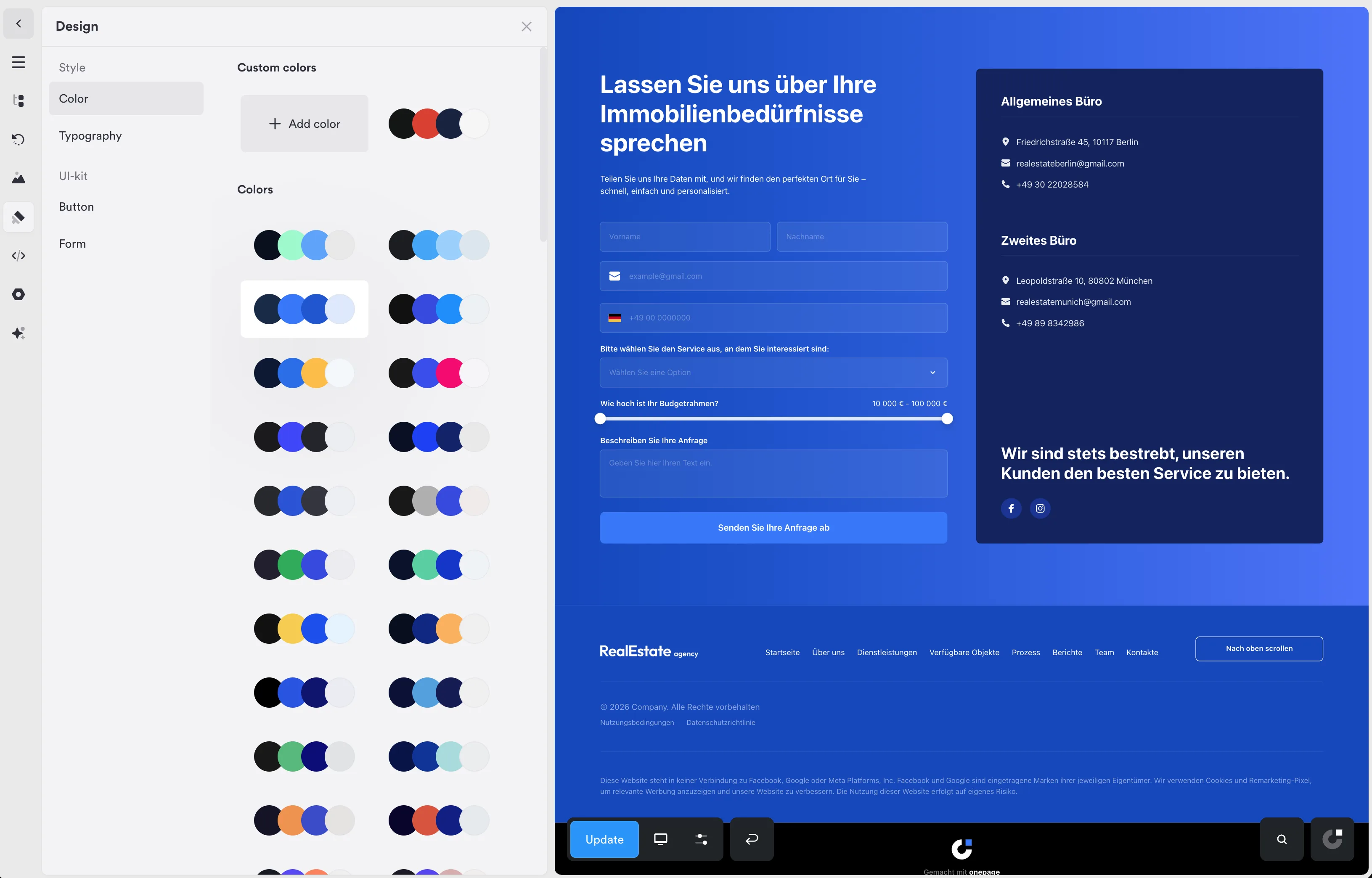 Swapping the site-wide color palette recolors every section live, no per-block editing required.
Who Onepage Is Actually For
The agency or freelancer building client pages on a deadline. This is the exact use case Onepage is priced and built around, and the speed of prompt-to-styled-section holds up under real use. If your bottleneck is turning a client brief into something on-brand fast, this earns its subscription.
Not the site owner who wants “SEO handled.” If you’re expecting the AI or the platform to manage your headings, meta fields, and heading-level SEO on autopilot, that’s not how either half of this product is built. The AI won’t touch page settings by design, and the standard blocks need a manual SEO pass before they’re client-ready. Budget the time for it, or hand that pass to whoever’s doing your on-page SEO.
If you already run a CRM you like (I found Freshsales’s AI lead scoring genuinely useful for pipeline work), Onepage’s built-in CRM won’t replace something that sophisticated. It’s built for capturing and holding leads from the pages you build here, not running a full sales pipeline.
The Bottom Line
Onepage at 7.5/10 is worth it for the audience it’s actually selling to. The build speed is real, the AI’s own output is more disciplined than the demo would suggest, and the CRM pipeline actually works when you test it end to end. The catch is specific, not vague: the platform’s default templates need a manual SEO pass, and the AUTO heading-tag setting doesn’t do what its name implies, Onepage confirmed every heading has to be set by hand. For an agency that knows to check both before handing a site to a client, this is a fast, capable builder. For anyone expecting SEO to be fully automatic, read this review twice before you subscribe.